

Choosing the right e-commerce platform is one of the most important decisions when starting an online business. Your platform affects how customers browse products, complete purchases, manage accounts, and interact with your store. It also determines how much control you have over functionality, design, security, and future development.
At NewtonByte, we understand that building an online store requires more than choosing a platform and adding products. Businesses need an ecommerce solution that supports their operations, customer expectations, and long-term growth.
OpenCart is one option worth considering, particularly for businesses looking for an open-source platform with greater control over their online store. However, it is not automatically the best choice for every business.
Before committing to development, it is important to understand what OpenCart offers, where it performs well, what ongoing responsibilities it creates, and whether its technical requirements match your business needs.
What Is OpenCart?
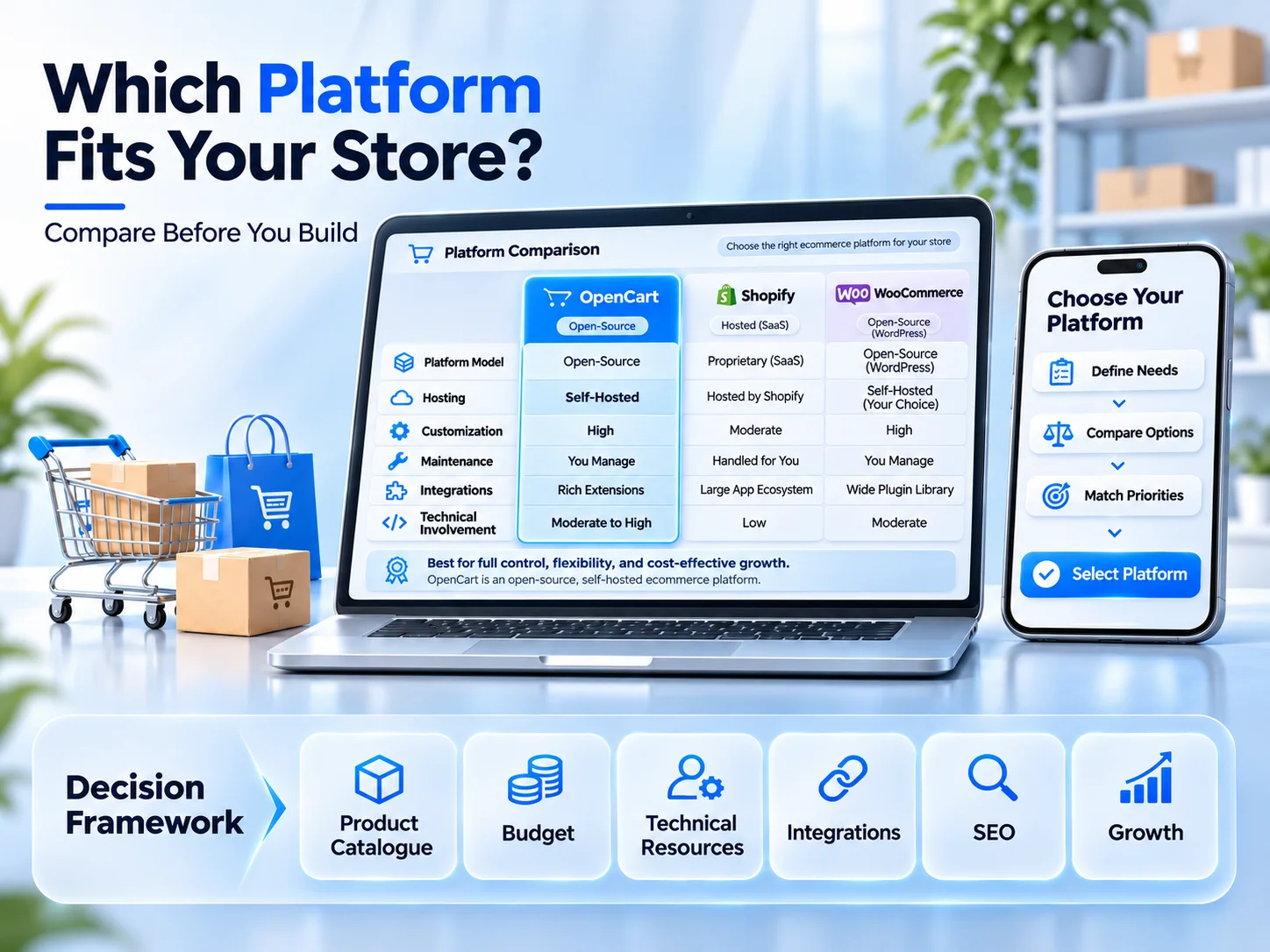
OpenCart is a free, open-source ecommerce platform that allows businesses to create and manage online stores. It provides an administrative dashboard where store owners can manage products, categories, customers, orders, discounts, shipping options, and other essential ecommerce activities.
Unlike hosted ecommerce platforms that include hosting and platform management within their subscription, OpenCart follows a self-hosted ecommerce model. This means you arrange your own hosting environment and take responsibility for maintaining the website.
Its open-source structure also gives developers the flexibility to modify existing functionality or add new features according to specific business requirements.
Some of its main capabilities include:
- Product and category management.
- Customer accounts and order management.
- Multiple payment and shipping options.
- Discount codes and promotional tools.
- Multi-store management capabilities.
- Extensions for additional functionality.
- Themes for storefront customization.
- Sales reports and administrative tools.
OpenCart provides a useful starting point for businesses that want to manage their ecommerce operations without being restricted to a fully hosted platform.
Why Do Businesses Consider OpenCart for Ecommerce?
The main reason businesses consider OpenCart is the level of control it provides over their online stores.
Rather than working entirely within a fixed platform structure, businesses can customize their store through extensions, themes, and development modifications.
Here are some reasons why it may be suitable for certain ecommerce businesses.
1. Open-Source Flexibility
OpenCart is open-source software, which means businesses can access its code and work with developers to customize the platform. This flexibility is useful when standard ecommerce features do not fully match your business requirements.
For example, a business may need custom product attributes, specialized pricing rules, additional checkout fields, or a particular order management workflow.
Developers can assess these requirements and determine whether they can be handled through existing functionality, an extension, or custom development.
2. Greater Control Over Your Store
With OpenCart, you have more direct control over your website files, hosting environment, database, and store configuration. This can be valuable for businesses that want control over how their e-commerce website operates.
However, greater control also means greater responsibility. Hosting, security, updates, backups, and technical troubleshooting must be managed properly.
3. Flexible Store Management
OpenCart provides administrative tools that help store owners manage everyday e-commerce activities. You can organize products into categories, update inventory, process orders, manage customer information, and configure different store settings from one dashboard.
For businesses with established product catalogues, these management features can make daily operations easier.
4. Customization Through Extensions
One of OpenCart’s useful features is its extension system. OpenCart extensions allow businesses to introduce additional functionality without necessarily modifying the platform’s core files.
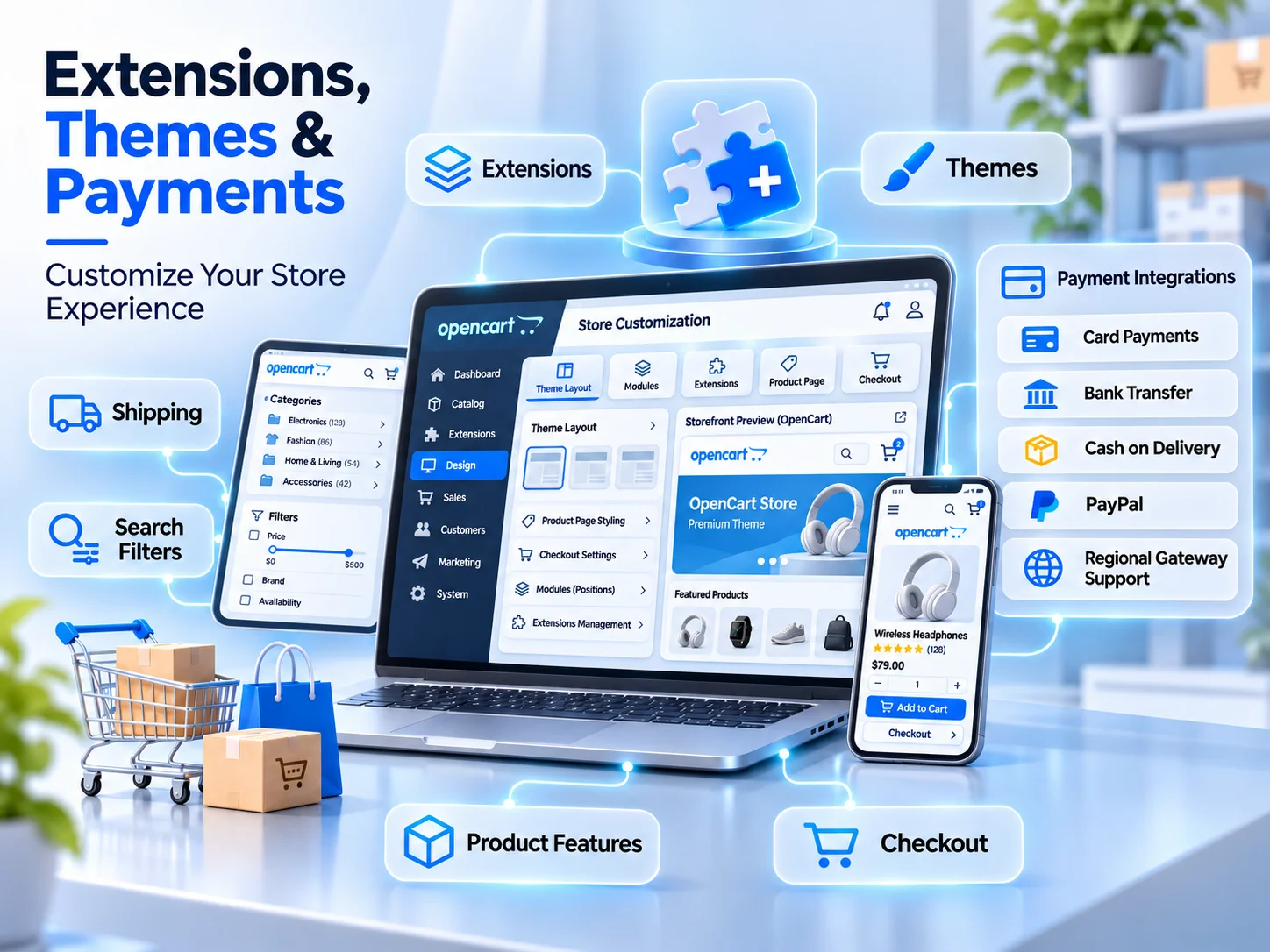
Depending on your requirements, extensions can support:
- Additional payment methods.
- Shipping and delivery services.
- Product filters and search improvements.
- Marketing and promotional tools.
- Reporting and analytics.
- Customer communication features.
- Inventory management improvements.
This makes it possible to expand a store as business requirements change.
OpenCart Extensions: What Can You Add to Your Store?
OpenCart extensions play an important role in determining how your ecommerce website functions. The default platform provides essential ecommerce capabilities, but many businesses need additional features to support their specific operations.
For example, an online fashion retailer may need advanced product filters, while a business selling electronic equipment may require additional product specifications and comparison functionality.
Before installing OpenCart extensions, consider the following factors:
Compatibility: Make sure the extension supports your installed OpenCart version and other components of your store.
Developer Support: Check whether the extension is actively maintained and whether technical assistance is available.
Security: Avoid installing extensions from untrusted sources. Poorly maintained code can introduce security vulnerabilities.
Performance: Too many extensions or inefficient modules can affect loading speed and create conflicts.
Business Value: Install extensions that solve genuine operational or customer experience problems rather than adding features you may never use.
A carefully selected extension setup can improve store functionality without making the website unnecessarily complicated.
OpenCart Themes: How Much Design Flexibility Do You Get?
Your ecommerce website design influences how customers perceive your business and navigate your products.
OpenCart themes allow you to customize the appearance and layout of your online store. They can change elements such as navigation, product listings, category pages, banners, typography, and other storefront components.
When evaluating OpenCart themes, do not focus entirely on appearance.
Consider these important factors:
- Mobile responsiveness: Your store should work properly across smartphones, tablets, and desktop devices.
- Loading performance: Avoid themes containing unnecessary scripts, animations, and oversized assets.
- User experience: Product information, pricing, navigation, and shopping cart access should be easy to understand.
- Customization options: Choose a theme that supports your brand identity and future design requirements.
- SEO structure: Check heading organization, navigation, product page layouts, and URL handling.
A visually attractive theme is not necessarily a well-performing e-commerce website. Businesses should evaluate design, usability, accessibility, and technical performance together before selecting a theme.
Payment Integrations: Can OpenCart Support Your Business?
Payment functionality is essential for any online store. Customers expect a straightforward checkout process with reliable payment options. OpenCart supports payment integrations through its available extensions and compatible gateway modules.
Depending on the payment provider and your business location, you may be able to configure options such as:
- Credit and debit card payments.
- PayPal.
- Bank transfer.
- Cash on delivery.
- Regional payment gateway services.
For businesses operating, payment gateway selection should be based on local availability, supported currencies, transaction requirements, settlement arrangements, and integration compatibility.
Before choosing a payment solution, check the following:
- Does the provider support your business location?
- Is the gateway compatible with your OpenCart version?
- Does it support the currencies your customers use?
- Does the checkout process work properly on mobile devices?
- Are payment failures and refunds handled correctly?
- Does the integration meet applicable security requirements?
A payment integration should be tested thoroughly before launch. Test successful payments, declined transactions, order confirmations, refunds, and other relevant checkout scenarios.
The goal is to make purchasing straightforward while ensuring transactions and order records are handled correctly.
Is OpenCart Good for SEO?
OpenCart can support an SEO-friendly ecommerce website, but installing the platform alone will not guarantee search engine rankings.
Your store still needs a properly planned SEO structure and ongoing optimization.
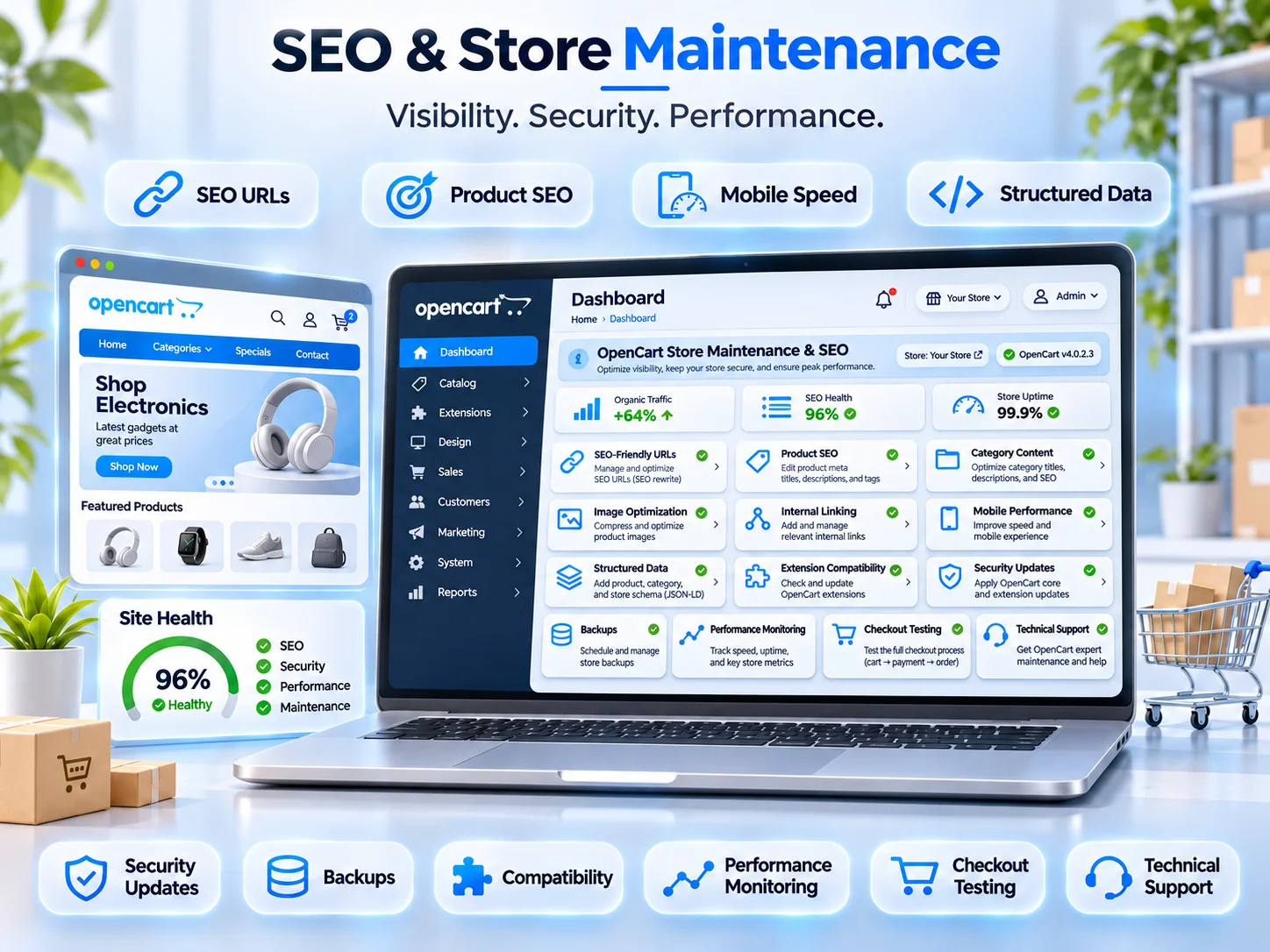
Important areas to address include:
SEO-Friendly URLs: Use descriptive URLs for product, category, and informational pages. Avoid unnecessary URL parameters where possible.
Product Page Optimization: Write unique product titles, descriptions, and metadata that explain what each product offers.
Category Page Content: Add useful category descriptions that help customers and search engines understand the products within each section.
Image Optimization: Compress product images, use descriptive filenames, and add meaningful alternative text.
Technical SEO: Review indexing, canonical tags, XML sitemaps, robots directives, structured data, and crawlability.
Mobile Performance: Ensure the website loads efficiently and provides a good shopping experience on smaller screens.
Internal Linking: Connect related products, categories, and informational pages to help customers discover relevant content.
Duplicate product descriptions, poorly structured URLs, slow pages, and unnecessary indexable pages can create SEO problems if they are not addressed during development.
For this reason, SEO should be considered during the initial store planning process rather than treated as a separate task after launch.
OpenCart Store Maintenance: What Happens After Launch?
One of the most important considerations before choosing OpenCart is understanding the ongoing maintenance involved. Because OpenCart uses a self-hosted ecommerce model, the business must arrange appropriate technical support to keep the website secure and operational.
Store maintenance is not simply about updating products or changing banners. It also involves protecting the website, monitoring its performance, and ensuring important ecommerce functions continue working correctly.
Your maintenance plan should cover:
Security Updates
Keep the platform, extensions, themes, and server software updated. Review security advisories and apply appropriate patches to reduce potential vulnerabilities.
Regular Backups
Maintain regular backups of website files and databases. Backups should be stored securely and tested periodically to confirm that your store can be restored if something goes wrong.
Performance Monitoring
Monitor page loading speed, server response times, database performance, and overall website availability.
Extension Compatibility
Check whether installed extensions remain compatible after updates. Test important features before applying changes to the live store.
Payment and Checkout Testing
Review checkout functionality periodically to identify payment failures, broken integrations, or problems with order processing.
Technical Support
Have access to developers who can investigate errors, resolve conflicts, troubleshoot integrations, and implement improvements when required.
Without a proper maintenance plan, even a well-designed ecommerce website can develop problems that affect customer experience and sales.
OpenCart vs Hosted Ecommerce Platforms: Which Should You Choose?
OpenCart is not the only option for building an online store. Platforms such as Shopify and WooCommerce also provide ecommerce functionality, but their management models are different.
The right choice depends on your technical resources, customization requirements, budget, and preferred level of control.
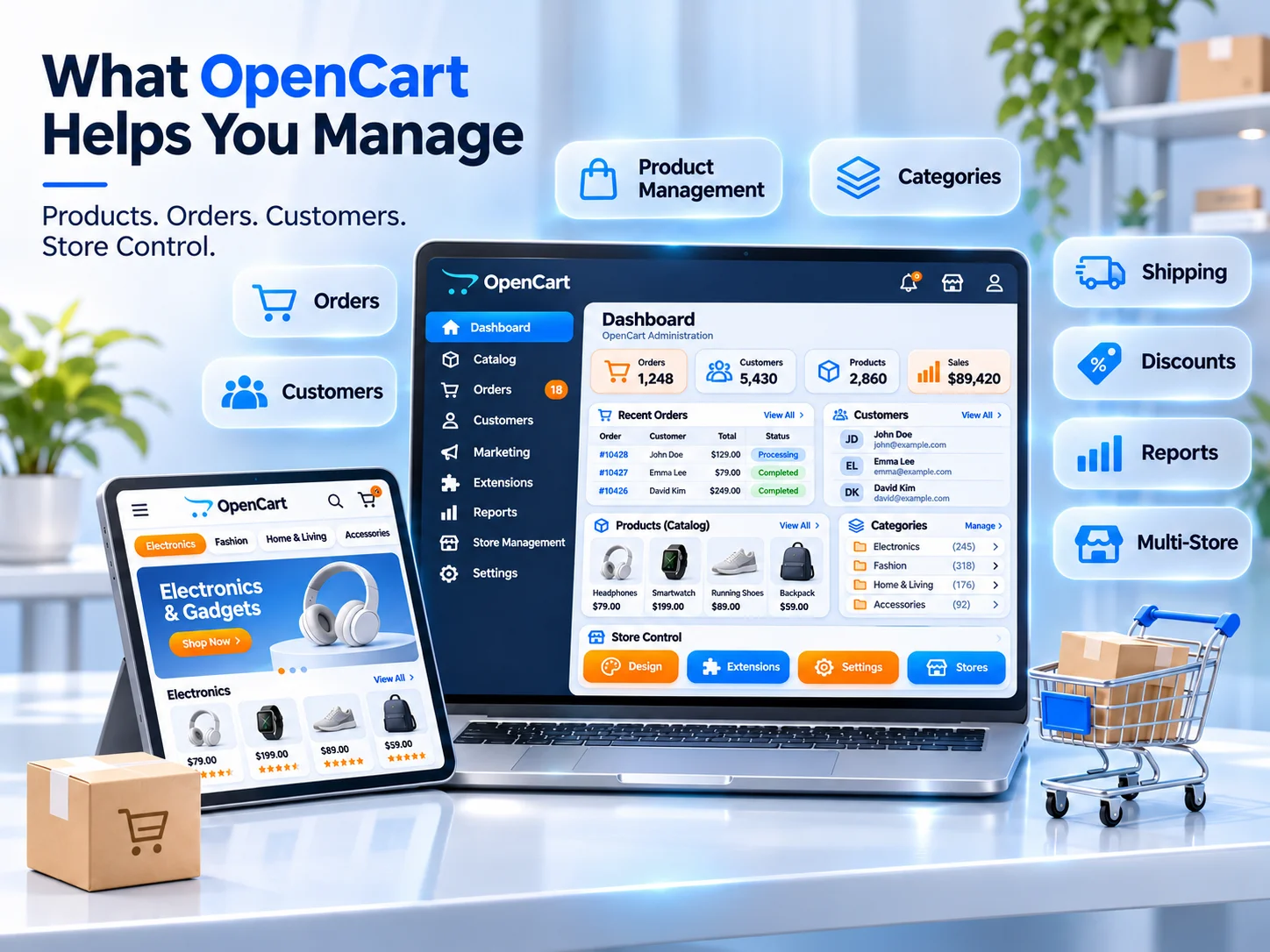
| Consideration | OpenCart | Shopify | WooCommerce |
| Platform model | Self-hosted, open-source | Hosted subscription | Self-hosted, open-source |
| Hosting | Arranged separately | Included in platform plans | Arranged separately |
| Customization | High, with development | Depends on the plan, apps, and development | High, with plugins and development |
| Maintenance | Managed by store owner or developer | Much of the infrastructure is managed by provider | Managed by store owner or developer |
| Extensions | OpenCart extensions | Shopify apps | WordPress plugins |
| Technical involvement | Moderate to high | Generally lower for routine infrastructure | Moderate to high |
Each platform has its own strengths.
Choose OpenCart if you want an open-source ecommerce platform, direct control over hosting and files, and flexibility to customize store functionality.
Choose Shopify if you prefer a hosted solution with less responsibility for server management and a more managed ecommerce environment.
Choose WooCommerce if you want to build an online store within WordPress and benefit from its content management and plugin ecosystem.
There is no universal winner. The best platform is the one that supports your business model without creating unnecessary technical or operational difficulties.
What Should You Consider Before Building an OpenCart Store?
Before starting development, take time to evaluate your requirements. Choosing a platform without understanding your operational needs can lead to expensive changes later.
Here are six important considerations.
1. Your Product Catalogue
Consider the number of products you plan to sell, product variations, categories, attributes, and inventory requirements.
A store with a small catalogue may have very different requirements from a business managing thousands of products.
2. Your Budget
Although OpenCart itself is free to download, building and operating an online store involves other expenses.
Your budget may include:
- Domain registration and hosting.
- Website design and development.
- Premium themes and extensions.
- Payment gateway charges.
- Security and backup services.
- Ongoing technical maintenance.
Evaluate the total cost of ownership rather than focusing only on the software price.
3. Your Technical Resources
Consider whether you have an internal technical team or will need external developers to manage hosting, updates, customizations, and troubleshooting.
This is particularly important for businesses without previous experience managing self-hosted ecommerce websites.
4. Your Integration Requirements
List the systems your store needs to connect with, including payment providers, shipping services, inventory software, CRM platforms, and accounting tools.
Confirm that suitable integrations are available before development begins.
5. Your SEO and Marketing Strategy
Think about how customers will discover your products.
Your website should support product optimization, category content, structured data, internal linking, analytics, and other digital marketing requirements.
6. Your Long-Term Growth Plans
Consider whether your store may need additional languages, currencies, product categories, customer features, or third-party integrations in the future.
A suitable technical structure should accommodate realistic business growth without requiring a complete rebuild every time your requirements change.
Should You Choose OpenCart for Your Online Store?
OpenCart can be a suitable option for businesses that want control over their ecommerce infrastructure and flexibility in how their online store operates. Its open-source structure, extension system, and customization capabilities make it worth considering for businesses with specific technical requirements.
However, it also requires careful planning around hosting, security, integrations, and ongoing store maintenance.
It may not be the right choice if you want a fully managed platform with minimal technical responsibility or if your business requires functionality that is difficult or expensive to implement. The important thing is to assess your business requirements before making a platform decision.
Build an Ecommerce Website That Supports Your Business Goals with NewtonByte
Choosing an ecommerce platform should be based on your business operations, customer expectations, and long-term development plans.
At NewtonByte, we help businesses build ecommerce websites with a focus on functionality, user experience, performance, and technical requirements.
Whether you are planning a new online store, improving an existing ecommerce website, or evaluating which platform best suits your business, our team can help you understand the available options.
Our web development services cover custom website development, ecommerce solutions, API integrations, performance optimization, and ongoing technical support.
We focus on building websites that are structured around real business requirements, with SEO considerations and future scalability included in the development process.
Planning an ecommerce website? Contact NewtonByte to discuss your project and find an ecommerce solution that fits your business.
Frequently Asked Questions
1. Is OpenCart free to use?
Yes. OpenCart is free, open-source ecommerce software. However, you still need to pay for expenses such as hosting, domain registration, premium extensions, custom development, and ongoing maintenance.
2. Is OpenCart suitable for small businesses?
Yes. OpenCart can be suitable for small businesses that want control over their online store and are comfortable managing or outsourcing technical responsibilities. Its suitability depends on product requirements, budget, and available technical support.
3. Does OpenCart support multiple payment gateways?
Yes. OpenCart supports payment integrations through compatible payment modules and extensions. The available options depend on your OpenCart version, payment provider, and business location.
4. Can I customize an OpenCart website?
Yes. You can customize an OpenCart website using themes, extensions, configuration options, and custom development. Developers can modify the storefront and introduce additional functionality according to your business requirements.
5. Is OpenCart good for SEO?
OpenCart can support SEO-friendly ecommerce websites. However, achieving good search visibility requires optimized product pages, category content, descriptive URLs, technical SEO, mobile performance, and a consistent content strategy.
6. Does OpenCart require regular maintenance?
Yes. Because OpenCart is self-hosted, store owners must manage or arrange security updates, backups, extension compatibility, performance monitoring, and technical troubleshooting.
7. Is OpenCart better than Shopify?
Neither platform is automatically better. OpenCart offers greater direct control over the hosting environment and source code, while Shopify provides a hosted ecommerce solution with less infrastructure management for store owners. Your choice should depend on your technical requirements and business preferences.
8. Can OpenCart handle business growth?
OpenCart can support growing ecommerce businesses when you plan the hosting environment, database, store configuration, and integrations properly. Performance and scalability depend on implementation quality and the resources available to maintain the store.