
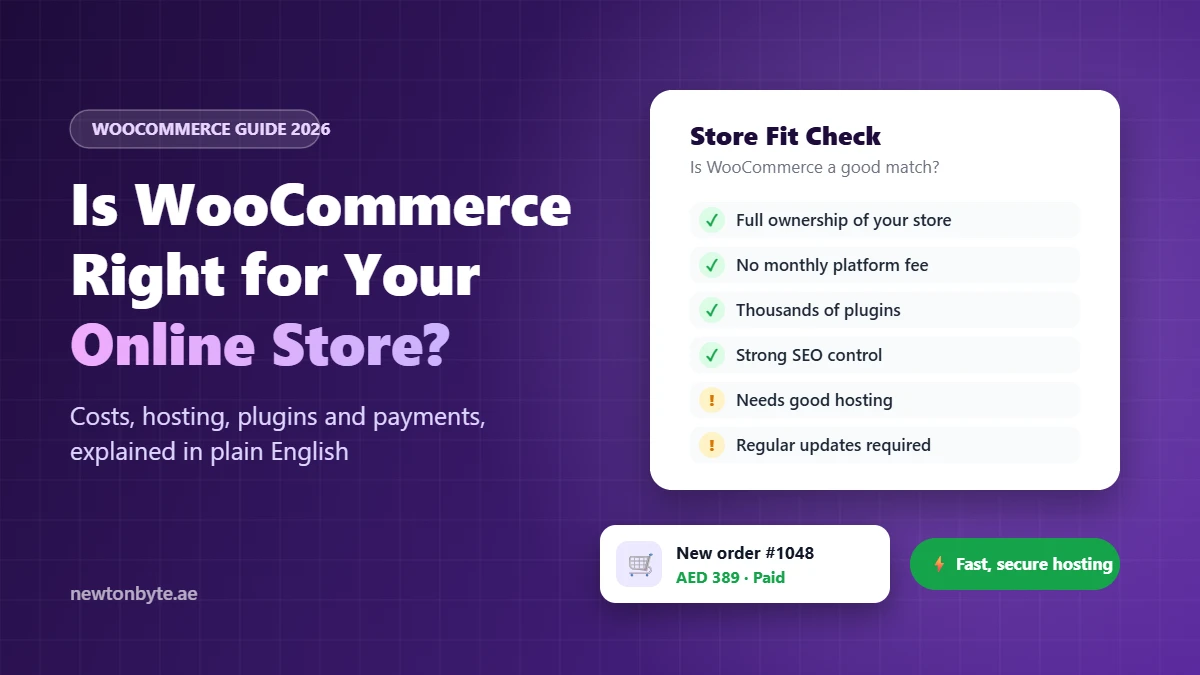
WooCommerce is right for your online store if you want full ownership, room to grow, and real control over your SEO, and you have someone to look after the technical side. If you’d rather never think about hosting, updates or security, a hosted platform like Shopify will probably make your life easier.
That’s the honest answer. The rest of this guide helps you work out which side you’re on, what WooCommerce really costs, and what to get right if you choose it.
What Is WooCommerce, in Simple Terms?
WooCommerce is a free plugin that turns a WordPress website into an online store. Once it’s installed, you can add products, take payments, manage orders and set delivery rates from the same dashboard you use to edit your pages and blog.
Here’s an easy way to picture it. A hosted platform is like renting a shop in a mall. Security, cleaning and maintenance are handled for you, you pay rent every month, and you follow the mall’s rules. WooCommerce is like owning your own shop. You choose the layout, the rules and who you work with, but you also look after the building.
It’s far from a niche choice. Store Leads data, reported by PureThemes, counts more than 4.3 million live WooCommerce stores in 2026, more than any other platform by store count.
Who WooCommerce Suits (and Who It Doesn’t)
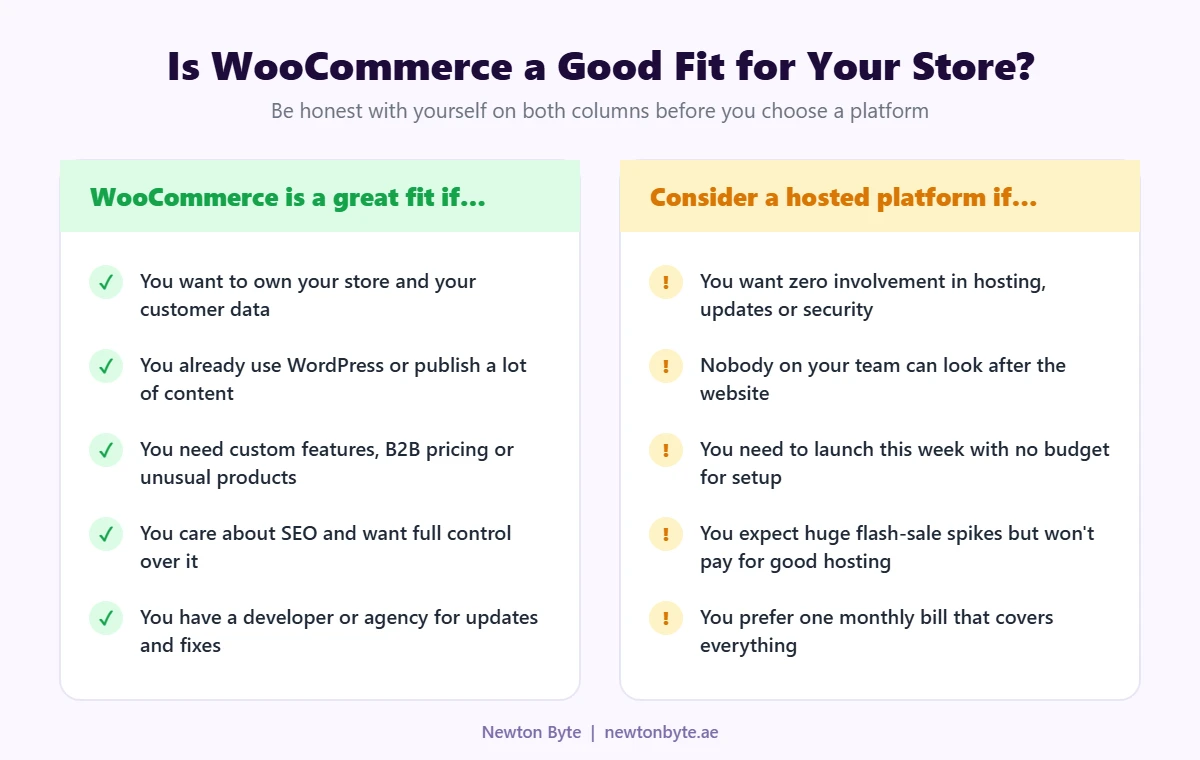
A few real-world examples make this clearer:
- A Dubai abaya brand that publishes styling guides and wants its blog and products to rank together on Google. WordPress e-commerce is a natural fit because content and the store live in one place.
- A Sharjah building supplies trader that needs different prices for trade customers, bulk ordering and quote requests. WooCommerce handles this with the right plugins or a little custom work, while hosted platforms often make these features harder to get or more expensive.
- A one-person gift shop that wants to launch next week and has nobody to maintain the site. A hosted platform is usually the smarter starting point.
The deciding question is rarely “Which platform is better?” It’s “Who will look after this store every month?” If you have a clear answer, WooCommerce opens up a lot of options.
What WooCommerce Really Costs
The plugin is free. Running a store isn’t. Here’s where the money actually goes:
| Cost | What it covers | What to watch |
|---|---|---|
| Hosting | The server your store runs on | The most important spend. Cheap hosting is the number one cause of slow stores |
| Domain and SSL | Your web address and the padlock in the browser | SSL is often free with good hosting |
| Theme | Your store’s design | Free or a one-time purchase. Speed matters more than looks |
| Paid plugins | Extra features such as shipping rules, filters or subscriptions | Most renew yearly, so the total grows quietly |
| Payment fees | A cut of each sale taken by your payment gateway | WooCommerce adds no platform fee of its own on top |
| Setup and maintenance | Building the store, updates, backups and fixes | Skipping this is what turns a cheap store into an expensive one |
For a rough idea, Colorlib estimates that WooCommerce stores typically spend between USD 500 and 5,000 a year on hosting, extensions and maintenance. Where you land depends mostly on how many paid plugins you need and who maintains the site.
A simple budgeting tip: before comparing platforms on price, write down every feature you need and mark each one as free, a paid plugin with a yearly renewal, or custom work. That list is your real budget, not the platform’s headline price. For a wider view of website pricing, see our guide to how much a website costs in Dubai.
WooCommerce Store Setup: What’s Involved
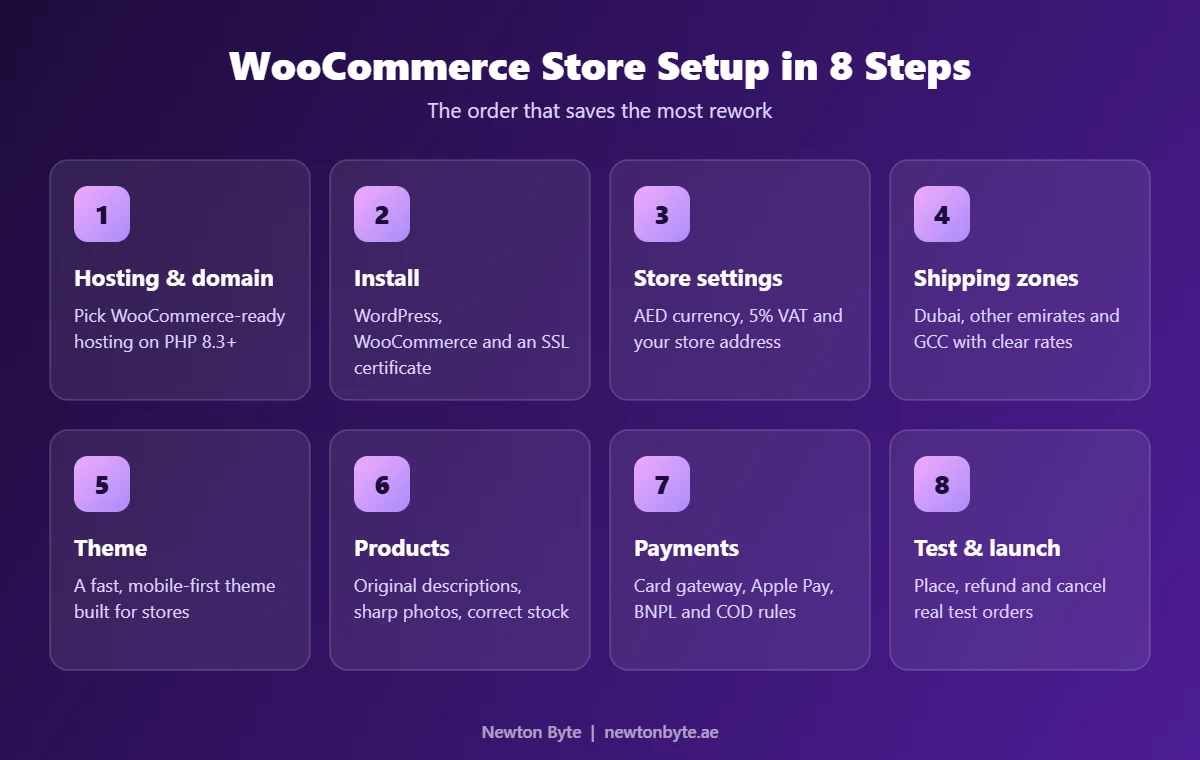
Most of these steps are straightforward. Three of them are where UAE stores usually slip up:
Store settings
Set your currency to AED and add your store address. If you’re VAT registered, turn on taxes and add the 5% standard rate. Decide early whether your prices include VAT. Consumer prices in the UAE are generally shown as VAT-inclusive, and changing this after you’ve added hundreds of products is a headache.
Shipping zones
Create separate zones for Dubai, the other emirates and, if you ship abroad, the GCC. Customers here are used to fast delivery, so show realistic delivery times and a clear free-delivery threshold. If you offer cash on delivery, decide whether it has a fee or an order limit.
Testing before launch
Place real test orders on your phone. Try a card payment, a failed payment, a refund, a cancellation and a cash-on-delivery order, and check that every email or WhatsApp notification goes out correctly. Ten minutes of testing can save you a week of refunds and complaints.
A simple store with a ready-made theme can go live in a few weeks once your products, photos and payment approval are ready. Stores with custom features take longer. If you’d rather hand the whole build over, our WooCommerce development team handles it end to end.
Payment Gateway Integration in the UAE
WooCommerce doesn’t process payments itself. It connects to a payment gateway through a plugin, and the gateway handles the card, the bank and the payout to you.
- WooPayments: WooCommerce’s own payment option is available to UAE businesses. Only business accounts are supported here, so you’ll need a trade licence to sign up.
- Other card gateways: Stripe, Telr, Network International and Checkout.com are common choices in the UAE. Make sure the WooCommerce plugin you use is official or actively maintained.
- Buy now, pay later: Tabby and Tamara are popular with UAE shoppers and can lift order values on higher-priced products.
- Cash on delivery: built into WooCommerce. It helps first-time buyers trust you, but set limits to cut down on refused deliveries.
When you compare gateways, look past the fee. Check whether it supports Apple Pay, how long payouts take, whether you can refund from your WooCommerce dashboard, and how quickly support responds when a payment fails. Getting the connection right matters too, and our payment gateway integration service takes care of the setup, testing and security checks.
WooCommerce Plugins: What You Need and What to Skip
Plugins are WooCommerce’s biggest strength and its most common trap. Every plugin is extra code running on your store, so install one only when it solves a real problem.
| Need | Type of plugin | Popular examples |
|---|---|---|
| Taking payments | Payment gateway | WooPayments, Stripe, Telr |
| Ranking on Google | SEO | Rank Math, Yoast SEO |
| Speed | Caching and performance | WP Rocket, LiteSpeed Cache |
| Protection | Security and off-site backups | Wordfence, UpdraftPlus |
| Delivery | Courier integration | Your courier’s official plugin, if it has one |
| Customer questions | Chat or WhatsApp button | Any lightweight chat plugin |
What to skip: two plugins that do the same job, heavy slider plugins, and “all-in-one” bundles where you’ll use two features out of thirty.
Before installing any plugin, check four things: when it was last updated, how many active installs it has, whether it supports the latest WooCommerce version and High-Performance Order Storage (HPOS), and what recent reviews say. If it fails two of these, find another option.
WooCommerce Hosting: Where Most Stores Go Wrong
Here’s something many people don’t realize. A blog page looks the same for every visitor, so it can be cached and served instantly. A cart, checkout or account page is different for every shopper, so the server has to build it fresh each time. That’s why hosting that runs a simple brochure site just fine can struggle with a store, especially during a sale.
Good WooCommerce hosting should give you:
- A current PHP version. Aim for PHP 8.3 or newer. WooCommerce has announced that version 11.6 will require PHP 8.1 or later, and PHP 8.2 stops getting security fixes at the end of 2026.
- Dedicated resources rather than a crowded shared server, plus object caching such as Redis.
- Servers close to your customers for faster loading in the UAE.
- Daily off-site backups and a staging site so you can test updates before they reach real shoppers.
- Support that understands WooCommerce, not just generic web hosting.
Our web hosting and DevOps services are set up with these needs in mind. Speed also affects rankings, which we cover in our guide to technical SEO in the UAE.
WooCommerce vs Shopify: A Quick, Fair Comparison
| WooCommerce | Shopify | |
|---|---|---|
| Ownership | You own the site and all your data | You run your store on Shopify’s platform |
| Platform fee | None. You pay for hosting and plugins | Monthly subscription plus paid apps |
| Hosting and updates | Your responsibility or your agency’s | Handled for you |
| Flexibility | Almost anything is possible | Flexible within the platform’s limits |
| SEO and content | Full control, with WordPress blogging built in | Good, with less control over some technical details |
| Ease for beginners | Moderate | Easy |
| Best for | Content-led brands, B2B, custom needs | Fast launches and teams without technical support |
Neither one is “better.” They suit different businesses. If your needs go beyond both, a custom ecommerce build may be the right call.
Common WooCommerce Mistakes (and Easy Fixes)
- Updating plugins on the live store. Test updates on a staging copy first. One broken update at checkout can cost a full day of sales.
- Installing a plugin for everything. Review your plugin list every few months and remove what you don’t use.
- Choosing hosting on price alone. Hosting is the foundation. Saving a little here usually costs more in lost sales.
- Never testing backups. A backup you’ve never restored is a guess. Test a restore at least once.
- Designing on a laptop. Most shoppers buy on their phones, so check every step of checkout on a phone.
- Thin product pages. Copying the supplier’s description gives Google nothing new to rank. Our ecommerce SEO guide for the UAE explains what to write instead.
Frequently Asked Questions
Is WooCommerce really free?
The plugin is free. You still pay for hosting, a domain, any paid plugins or themes, payment fees, and someone to maintain the store.
Is WooCommerce good for SEO?
Yes. Because it runs on WordPress, you get full control over URLs, page titles, content and structured data. Good rankings still depend on fast hosting and original content, not the platform alone.
Can WooCommerce handle a large store?
Yes. WooCommerce can run stores with thousands of products and a high volume of orders. When large stores slow down, the cause is usually weak hosting or too many plugins, not WooCommerce itself.
Does WooCommerce support Arabic?
WordPress supports Arabic and right-to-left layouts. For a bilingual English and Arabic store, you’ll also need a translation plugin such as WPML or Polylang and a theme that handles RTL properly.
Can I move my store from Shopify to WooCommerce?
Yes. Products, customers and orders can be migrated with dedicated tools. The important part is setting up redirects so you keep your Google rankings, which we explain in our guide to redesigning a website without losing SEO.
So, Is WooCommerce Right for You?
Ask yourself three questions. Do you want to own your store and your data? Do you need flexibility that standard platforms make difficult or expensive? And do you have someone to handle hosting, updates and backups? If the answer to all three is yes, WooCommerce is very likely the right choice.
If you’re new to selling online, start with our guide on what ecommerce is and how an online store works. And if you’d like a second opinion on your plans, Newton Byte builds, hosts and grows WooCommerce stores for UAE businesses. Contact us, and we’ll tell you honestly whether WooCommerce fits your store.