


Quick Answer
| Google Ads conversion tracking in the UAE works best when three systems are connected correctly: Google Tag Manager fires the tags, GA4 records the events as “key events,” and Google Ads imports the ones that matter as “conversions.” For most UAE businesses, that means tracking form fills, phone calls, and WhatsApp clicks, not just website purchases, because WhatsApp and phone are how the majority of local customers actually convert. |
| Key Takeaways • GA4 calls them “key events.” Google Ads calls the imported ones “conversions.” Same action, two names, and the attribution windows behind them are not identical. • WhatsApp click tracking is not optional for most UAE businesses. Hikmah AI reports 95%+ UAE WhatsApp usage and 30 to 60% of Dubai business inquiries arriving through WhatsApp. • Set GA4’s timezone to Asia/Dubai and currency to AED before importing any conversion data, or every report will carry a silent error. • UAE’s federal PDPL law affects how consent and tracking data should be handled, particularly for call recording and WhatsApp data capture. • Phone call tracking needs a dedicated platform. UAE-compatible options include CallRail, WhatConverts, and Ruler Analytics, since not every call-tracking tool supports +971 numbers. • Verify every tag in GTM Preview mode before publishing. A tag that looks correct in the interface can still fail to fire on the live page. |
Why Conversion Tracking Breaks Most Often for UAE Businesses
Conversion tracking rarely fails because of one obvious mistake. It fails because three separate systems are involved: Google Tag Manager, GA4, and Google Ads. Each one uses slightly different rules for what counts as a conversion and when. Get one setting wrong in any of the three and the numbers in your Google Ads dashboard stop matching what actually happened on your website or in your inbox.
For UAE businesses specifically, two extra problems show up constantly. First, most guides written for US or European markets assume the customer fills out a form and waits for an email reply. In the UAE, a large share of buying decisions happen over WhatsApp or a phone call instead. If those channels are not tracked, Google Ads optimizes toward the wrong signal entirely.
Second, region-specific settings like timezone, currency, and Ramadan-period seasonality are routinely left on their default US values. This quietly distorts every report built on top of them. Sometimes the distortion goes unnoticed for months.
At Newton Byte, this is one of the most common fixes we make when we audit an existing UAE Google Ads account. The problem is rarely a broken campaign. It is usually a conversion tracking setup that was never adjusted for how UAE customers actually behave.
Step 1: Understand the GA4 “Key Events” vs Google Ads “Conversions” Distinction
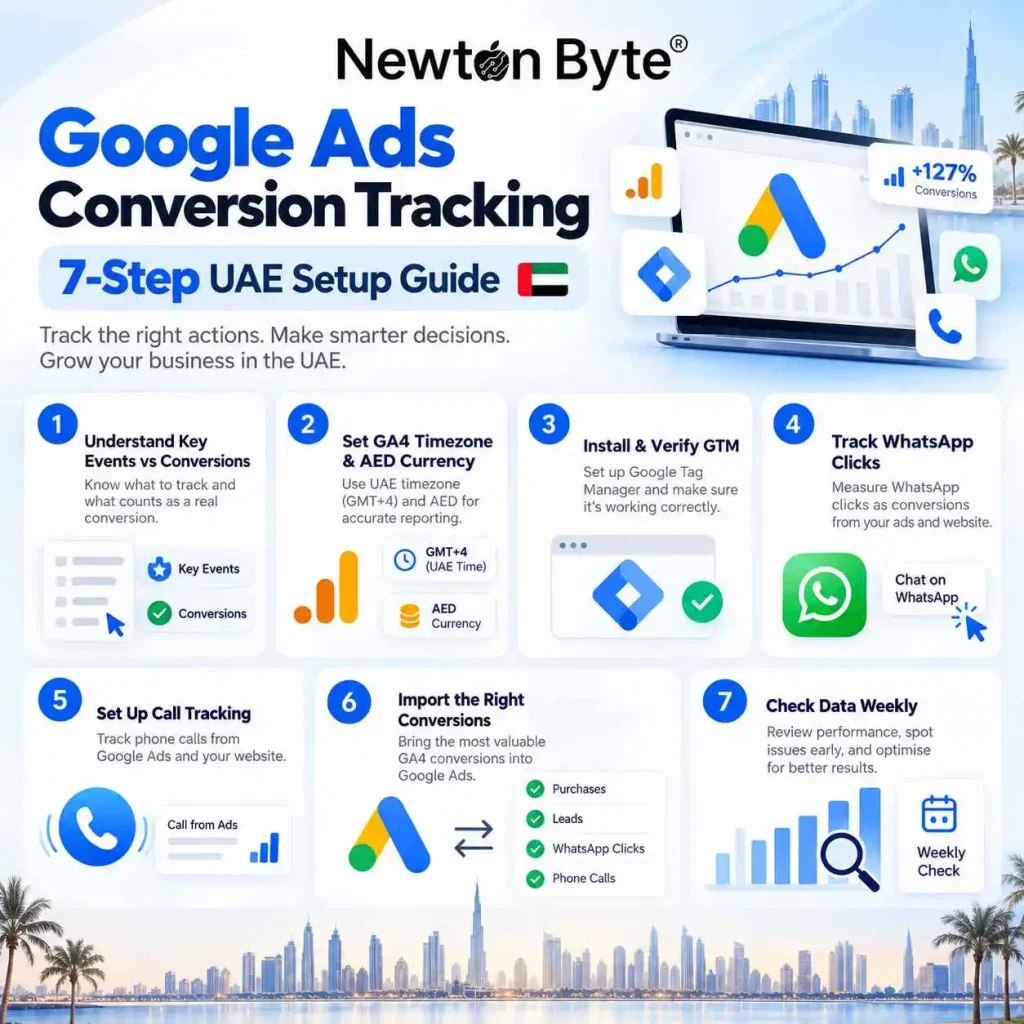
Google renamed GA4 conversions to “key events” in 2024, but Google Ads still calls its own imported actions “conversions.” These are related but not identical concepts. A key event is something you mark as important inside GA4, based on your GA4 property’s own event data and attribution model.
A Google Ads conversion is a key event you have chosen to import into Google Ads. Once imported, it follows Google Ads’ own attribution settings instead of GA4’s. Those settings can use a different lookback window than the one GA4 used when it first recorded the event.
This distinction, explained clearly by Mayantha.net, is the source of a huge amount of confusion in UAE Google Ads accounts. A business owner sees one conversion count in GA4 and a different number in Google Ads for what looks like the same action. The instinct is to assume something is broken. Usually nothing is broken at all. The two platforms are simply counting under different rules, and once you understand that, the numbers make sense again.
| ⚠ Google’s own support documentation confirms that GA4 key events and Google Ads conversions can report different totals for the same underlying action, and that this is expected behavior tied to differing attribution settings, not a tracking error. |
Step 2: Set GA4’s Regional Settings Before You Track Anything
Before marking a single key event, set GA4’s reporting timezone to Asia/Dubai, or the correct timezone for your specific emirate, and set its currency to AED. This is a one-time setting inside GA4’s property configuration.
Skipping it means every session, every conversion timestamp, and every revenue figure gets recorded against the wrong day and the wrong currency baseline. Weeks of data can look accurate on the surface while quietly being misaligned underneath.
rafirit.com’s research also recommends creating custom GA4 events around Ramadan and Eid periods specifically. UAE consumer behavior shifts noticeably during these windows. Lumping that traffic in with the rest of the year can hide real performance swings from your reporting. That makes it harder to plan next year’s seasonal budget with any confidence.
| GA4 Setting | Default Value | Correct UAE Value | Why It Matters |
| Reporting timezone | United States (varies) | Asia/Dubai | Aligns event timestamps with when UAE customers actually convert |
| Reporting currency | USD | AED | Prevents automatic currency conversion errors in revenue reports |
| Seasonal events | None | Custom Ramadan/Eid event windows | Isolates genuine seasonal demand shifts from baseline performance |
| Regional priority | Not set | Dubai first, then all 7 emirates | Matches how most UAE ad budgets are actually allocated and scaled |
Step 3: Install and Verify Google Tag Manager
Google Tag Manager, or GTM, is the layer that actually fires your tracking tags on the website. googlemarketing.io’s walkthrough is a reasonable baseline here. Install the GTM container code on every page and connect it to your GA4 configuration tag. Then set up triggers for the actions you want to track, such as a form submission or a button click.
The step most guides gloss over is verification. Before you publish any GTM container, use GTM’s built-in Preview mode to click through your own site. Confirm that each tag actually fires when it should, and does not fire when it shouldn’t.
reuads.com’s checklist is useful here as a basic starting point. A thorough UAE setup needs to go further, though, and verify WhatsApp and call tracking as well, which most generic checklists do not cover at all.
Step 4: Track WhatsApp Clicks as a Primary Conversion, Not an Afterthought
This is the single most UAE-specific step in the entire process, and the one most international guides miss completely. Hikmah AI’s research states that WhatsApp usage among UAE residents exceeds 95%. It also finds that many Dubai businesses receive between 30 and 60% of their total inquiries through WhatsApp rather than through a contact form or phone call.
If your Google Ads account is only tracking form submissions, it is blind to what may be your largest single conversion channel. That is a significant gap in a market where WhatsApp is often the customer’s first and preferred point of contact.
Setting this up correctly takes a few connected steps. Add a GTM trigger on your WhatsApp click-to-chat button, whether that is a wa.me link or an embedded WhatsApp widget. Fire a GA4 event when that click happens, mark it as a key event, and import it into Google Ads as a conversion action.
- Add a GTM click trigger targeting your WhatsApp button’s link or CSS class.
- Fire a GA4 event, for example whatsapp_click, when that trigger activates.
- Mark whatsapp_click as a key event inside GA4’s configuration.
- Import it into Google Ads as a conversion action, ideally set as a secondary conversion until you have enough volume to judge its value.
Step 5: Set Up Call Tracking With a UAE-Compatible Platform
Phone calls are the second major offline channel that generic conversion tracking setups miss. Google Ads offers native call tracking through call extensions, but it depends on Google’s forwarding number infrastructure. That infrastructure does not always behave reliably with +971 numbers or with calls that get transferred internally within a UAE business.
Hikmah AI’s research names three platforms that reliably support UAE call tracking: CallRail, WhatConverts, and Ruler Analytics. Each one connects a dynamic phone number to your website and records which ad or keyword drove the call.
That data can then be pushed back into GA4 and Google Ads as a conversion, once the call meets a minimum duration you define. A 60-second threshold is common, and it helps filter out accidental or spam calls that never reach a real conversation.
| ⚠ Call recording and data capture in the UAE fall under the federal PDPL data protection law, referenced by Mayantha.net. If you record calls for quality or tracking purposes, make sure your call-tracking platform’s consent and disclosure settings comply with PDPL requirements before you switch it on. |
Step 6: Import the Right Key Events Into Google Ads
Not every GA4 key event belongs in Google Ads. Importing too many, including low-value actions like a newsletter signup or a page scroll, dilutes Google Ads’ automated bidding. The algorithm starts optimizing toward whichever action happens most often, rather than the action that actually drives revenue.
A practical UAE-focused import list usually looks like this: WhatsApp click, phone call over a minimum duration, form submission, and, for ecommerce businesses, completed purchase. Keep secondary or lower-value events tracked in GA4 for analysis.
Leave those secondary events out of Google Ads’ primary conversion set, though. That keeps Smart Bidding focused on what actually matters to the business, instead of chasing volume for its own sake.
Step 7: Cross-Check the Numbers Weekly, Not Just Once
Conversion tracking is not a one-time setup. Man Made Marketing’s research warns against comparing fresh GA4 data directly against old Universal Analytics numbers, since the two platforms measure sessions and conversions differently. The same caution applies to comparing GA4 key events against Google Ads conversions week to week.
A short weekly check catches problems early. Open GA4 and Google Ads side by side, and confirm the key events you expect to see are still firing.
Confirm the totals are in a reasonable range of each other, given their different attribution windows. A sudden drop to zero for any tracked event almost always means a website update broke a tag. It rarely means customers actually stopped converting.
Common Conversion Tracking Mistakes We See in UAE Google Ads Accounts
- Tracking only form fills and missing WhatsApp entirely, despite it being the primary inquiry channel for many local businesses.
- Leaving GA4’s timezone and currency on US defaults, which quietly skews every report built afterward.
- Importing every GA4 key event into Google Ads instead of a focused, high-value set, which confuses Smart Bidding.
- Using Google Ads’ native call extensions alone in a market where a dedicated UAE-compatible call-tracking platform gives more reliable attribution.
- Never re-verifying tags after a website redesign, so tracking silently breaks the moment the site changes.
What a Properly Tracked UAE Google Ads Account Looks Like
It helps to picture the end state before building toward it. In a properly tracked UAE Google Ads account, GA4 is set to Asia/Dubai time and AED currency, so every report already reflects the local calendar without manual adjustment.
WhatsApp clicks, qualifying phone calls, form submissions, and purchases are all firing as GA4 key events and flowing into Google Ads as a focused conversion set. Smart Bidding is optimizing toward the actions that actually matter to the business, not toward whichever event happens to be easiest to track.
Someone on the team checks GA4 and Google Ads side by side at least once a week. A broken tag then gets caught within day rather than being discovered a quarter later when the ad spend report looks unexplainably weak. This is the standard Newton Byte builds toward on every UAE Google Ads account it manages.
Conclusion
Reliable Google Ads conversion tracking in the UAE comes down to connecting three systems correctly: Google Tag Manager, GA4, and Google Ads. Each needs to be adjusted for how UAE customers actually convert, through WhatsApp and phone calls as much as through web forms.
Get the regional settings right, track the channels your customers actually use, and check the numbers weekly. Do not assume a setup that worked on day one still works six months later. Newton Byte builds and audits this exact kind of UAE-specific conversion tracking setup as part of its Google Ads management work. It is the WhatsApp and call-tracking gaps that most generic guides never catch.
Frequently Asked Questions
A GA4 key event is an action you mark as important inside your GA4 property, based on GA4’s own attribution model. A Google Ads conversion is a key event you have chosen to import into Google Ads, where it then follows Google Ads’ own attribution settings. The two can report slightly different totals for the same action because their underlying attribution windows are not identical.
For most UAE businesses, yes. Research from Hikmah AI shows that a large share of Dubai business inquiries, in some cases 30 to 60%, arrive through WhatsApp. If WhatsApp clicks are not tracked, Google Ads is optimizing without visibility into a major conversion channel.
Google Ads offers native call extensions with built-in call tracking, but they rely on Google’s own forwarding infrastructure. That infrastructure does not always handle +971 numbers or internally transferred calls reliably. UAE-compatible third-party platforms such as CallRail, WhatConverts, or Ruler Analytics typically provide more consistent tracking for local businesses.
The most common cause is GA4’s timezone and currency settings still being on their US defaults instead of Asia/Dubai and AED. This does not stop data from being collected. But it misaligns timestamps and revenue figures. The reports end up looking incorrect even when the underlying tracking is working fine.
Fewer than most businesses assume. A focused set, typically WhatsApp clicks, qualifying phone calls, form submissions, and purchases for ecommerce, gives Google Ads’ Smart Bidding a clear signal. Importing every available GA4 key event, including low-value actions, dilutes that signal and can hurt campaign performance.
Yes. UAE’s federal PDPL law affects how consent and data capture should be handled. This applies particularly to call recording used in call-tracking platforms, and to any personal data collected through WhatsApp or form tracking. It is worth reviewing your tracking platform’s consent settings against PDPL requirements before launch.
At minimum, weekly. A quick side-by-side check of GA4 and Google Ads confirms that expected key events are still firing and that totals remain in a reasonable range of each other. Website updates are the most common cause of tracking silently breaking. A weekly check catches that quickly, instead of losing weeks of accurate data.
Conclusion
Reliable Google Ads conversion tracking in the UAE is not just about installing a tag. It depends on connecting Google Tag Manager, GA4, and Google Ads correctly so the actions that matter to your business—such as form submissions, WhatsApp clicks, qualifying phone calls, and purchases—are recorded and used for campaign optimisation. Pasted text
For UAE businesses, the setup also needs to reflect local customer behaviour. GA4 should use the correct UAE timezone and AED currency, while WhatsApp and phone enquiries should be treated as important conversion channels rather than ignored in favour of website forms alone. Keeping the Google Ads primary conversion set focused on high-value actions also gives Smart Bidding a clearer signal to optimise toward. Pasted text Pasted text
Most importantly, conversion tracking should be monitored continuously rather than treated as a one-time setup. Website updates, tag changes, and tracking issues can affect reporting without being immediately obvious, so checking GA4 and Google Ads regularly helps identify problems before valuable data is lost. Newton Byte helps UAE businesses build and audit conversion tracking setups designed around the way their customers actually generate leads and sales.